

Invoices come in through Documents. Intakt reads them, matches them to the purchase order or order and what was received, and sends the clean ones on for approval.
- Bring the invoice in. Drop the PDF on Documents, or have suppliers email it to your account’s own address, shown on that page. Intakt reads it for you.
- Check what it read. Press Review. Check the values it found, untick anything wrong, and press Create invoice…. Check the form and press New invoice.
- Look at the match. The Matching card says in one sentence what it found, and line by line what doesn’t agree with the order. A clean match moves on by itself. If it couldn’t tell which order the invoice is for, pick one from the list and press Match.
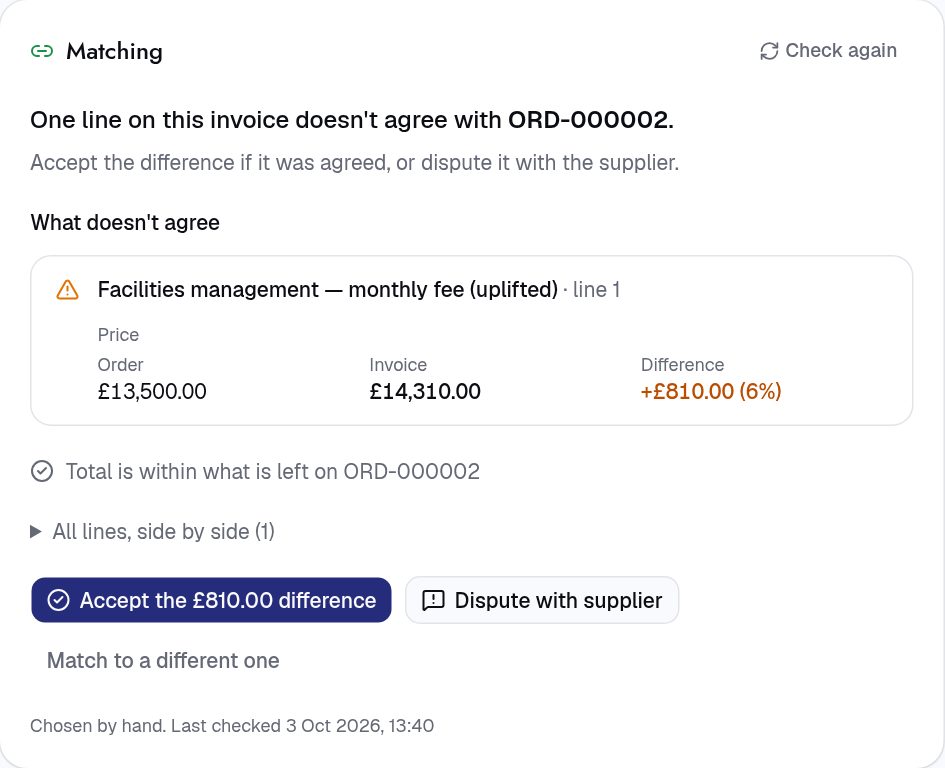
- Sort out an exception. If something doesn’t match, the invoice shows as Exception. Press Accept the difference (the button names the amount) with a reason if it was agreed, or Dispute with supplier: we email them your reason and hold the invoice out of payment runs until it’s sorted.
- Approve it. Clean invoices go to whoever your approval rules name. Once approved, it goes on the next payment run by itself.
Waiting on a delivery? The invoice shows Awaiting receipt until someone records it. See “Receive what you ordered”.
For procurement teams
- Tolerances: a unit price may be up to 2% off per line, and the total up to 5.00 in its currency over what is left. More than that is an exception.
- Approval: an invoice that isn’t matched, or has an exception, waits for finance to accept or dispute it. Clean ones follow Administration › Approval policies, and can be approved automatically up to an amount you set (off by default).
- Duplicates: the same supplier and invoice number twice is refused.
- Locked once approved: supplier, invoice number, issue date, currency, amounts and what it matched are fixed. Ask the supplier for a credit note or a corrected invoice instead.
- Exceptions and disputes raise a high-priority task so they don’t get lost.
Next: Pay suppliers