

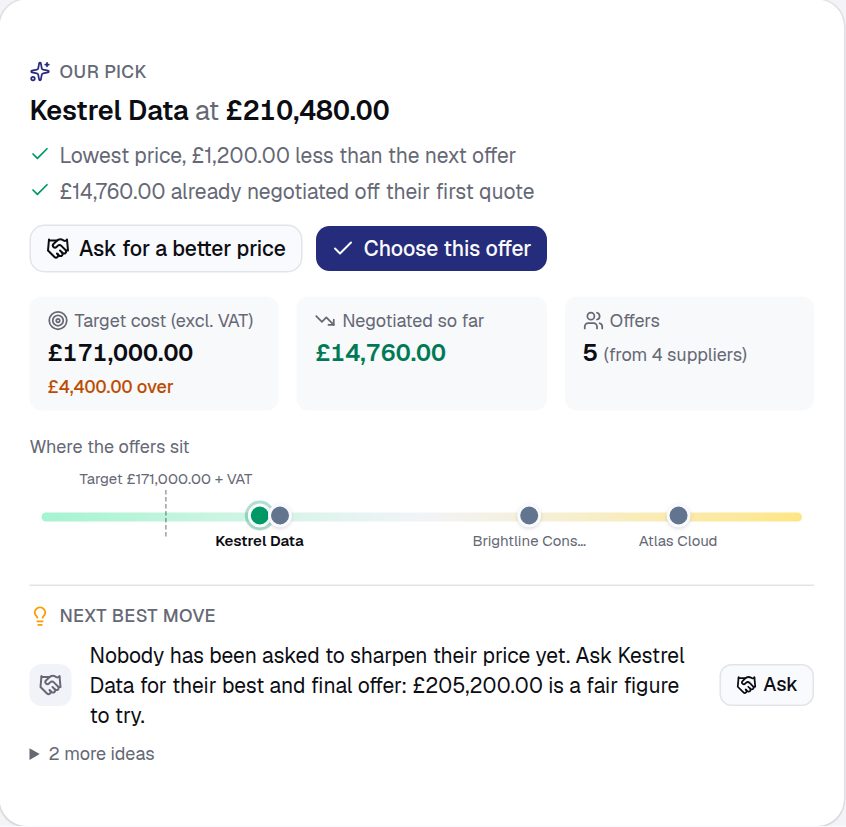
When the quotes are in, the request shows the deal in one place: every offer against your target cost, which one we’d pick, and the next best move.
- Read the summary. It shows how many offers there are, your target cost, and what you’ve negotiated so far. Our pick is the cheapest offer, or the best scored if you used a questionnaire.
- Compare them. Switch to Compare to see the offers side by side, with the best price and terms marked.
- Ask for a better price. Press Ask for a better price. It suggests a price to ask for and a date, and writes the email. Press Open in email and record to send it from your own email.
- Add the new price. When the supplier replies, press Add round 2 on their offer and type in the new prices. It replaces the old offer and counts the saving.
- Choose one. Press Choose this offer. If it isn’t the cheapest or our pick, say why, so approvers can follow the decision. The others are marked as not chosen.
Only two offers? It’s good practice to get three. The summary will remind you.
For procurement teams
- Our pick is the top score when the offers have been scored, otherwise the cheapest open offer in the request’s currency, with quicker delivery breaking a tie. Offers expiring within 7 days are flagged.
- The suggested ask matches the lowest rival, or else meets your target cost, or else takes 5% off.
- Intakt doesn’t email the ask for you. It records what you asked for and by when, then shows whether the target was met.
- Declined suppliers aren’t emailed. Their quote link says another offer was chosen. Choose who goes forward sets the rest aside, and you can tell them by email.
- Savings are measured net of VAT against first-round prices, and recorded when an order is raised from the chosen offer.
Next: Raise a purchase order